PixSip Compression Benchmark: 20 Real Photos, Every Number Shown
Methodology, per-image table and summary of a 20-photo JPG benchmark run through PixSip's own pipeline: 2,272 KB in, 1,463 KB out.
Everywhere on this site we quote numbers — 18 of 20 against TinyPNG, a 691 KB reference photo, a 46 dB PSNR palette conversion. A claim without a method is marketing, so this post is the method: a full benchmark of 20 real photographs run through PixSip's own compression pipeline, with every per-image number published.
Methodology
The images. 20 photographs downloaded from Picsum (real, CC-licensed photography, not synthetic test patterns), spanning 8 sizes from 640×480 to 1920×1080, original sizes 26 KB to 232 KB.
The pipeline. Each JPG was compressed through the production PixSip tool running in Chromium — the same WebAssembly MozJPEG encoder and worker pipeline the website ships, at the fixed quality 65 the tool always uses.
What we did not do. No cherry-picking: this is the first 20 images downloaded, in order. No re-runs to improve numbers. The table below is every image, including the worst one.
The full table
| Image | Original | Compressed | Saving |
|---|---|---|---|
| img14 | 227 KB | 158 KB | −30% |
| img18 | 194 KB | 105 KB | −46% |
| img7 | 166 KB | 117 KB | −30% |
| img2 | 155 KB | 84 KB | −45% |
| img9 | 140 KB | 90 KB | −36% |
| img17 | 137 KB | 90 KB | −34% |
| img16 | 130 KB | 92 KB | −29% |
| img13 | 130 KB | 85 KB | −35% |
| img10 | 129 KB | 80 KB | −38% |
| img8 | 129 KB | 89 KB | −31% |
| img11 | 108 KB | 74 KB | −31% |
| img19 | 100 KB | 70 KB | −29% |
| img15 | 98 KB | 65 KB | −33% |
| img3 | 79 KB | 54 KB | −32% |
| img6 | 78 KB | 50 KB | −36% |
| img1 | 73 KB | 38 KB | −49% |
| img5 | 67 KB | 35 KB | −48% |
| img4 | 61 KB | 41 KB | −33% |
| img20 | 44 KB | 30 KB | −33% |
| img12 | 26 KB | 16 KB | −39% |
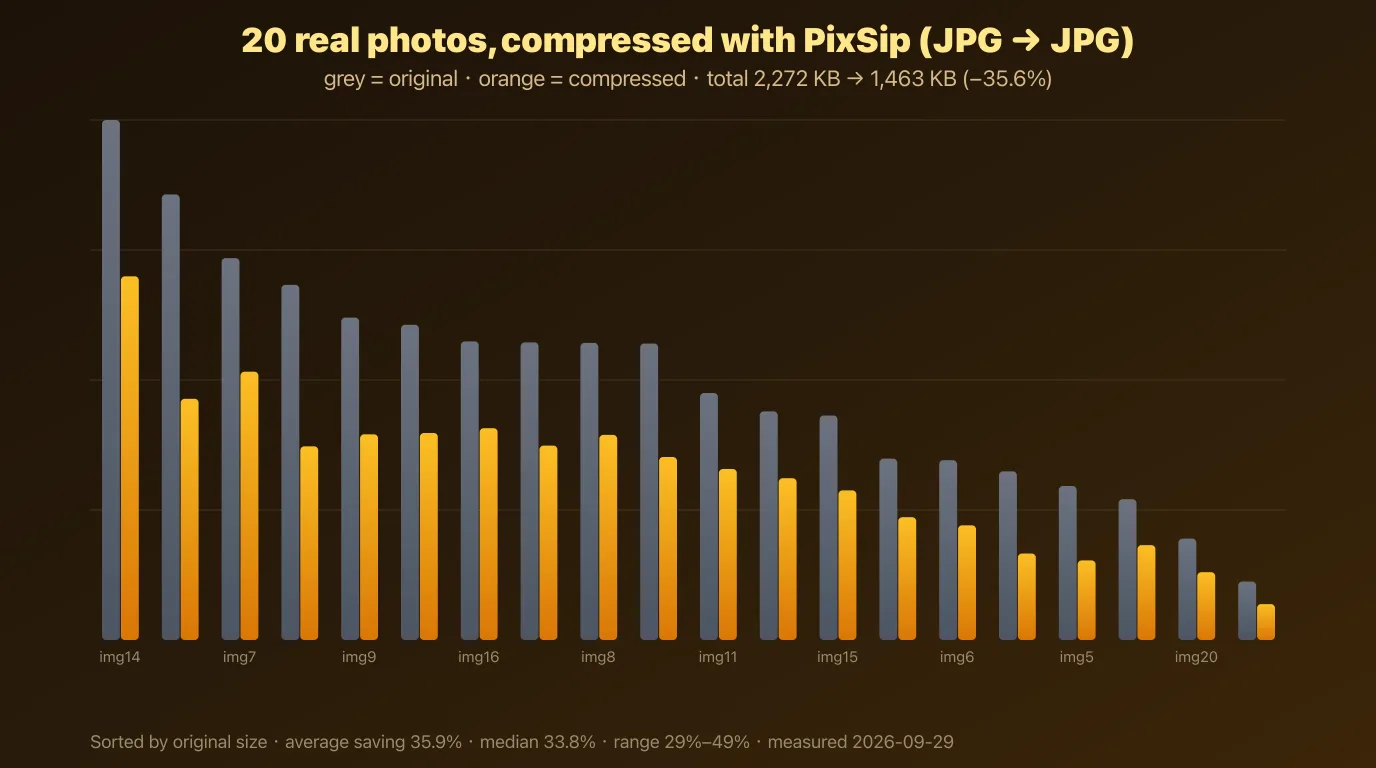
Summary
- Total: 2,272 KB → 1,463 KB, a 35.6% reduction across the batch
- Average saving per image: 35.9% · median: 33.8%
- Range: 29% to 49%
What the data says
Saving correlates with image detail, not image size. The best results (−45% to −49%) are photos with large smooth areas — sky, walls, shallow depth of field — where MozJPEG can discard what the eye cannot see. Busy, high-texture frames sit at −29% to −31% because there is less redundancy to remove.
Small files save proportionally less. A JPG has a fixed amount of structural overhead, so a 26 KB file cannot halve the way a 194 KB file can. The tool hands back already-optimised files untouched rather than degrading them for a number.
The range is honest. 29% to 49% is a wide band, which is exactly why we publish the table instead of a single headline number — "up to 49% smaller" is true, and so is "29% on the worst image".
How this relates to the other numbers on this site
- The 18-of-20 TinyPNG comparison comes from a separate benchmark: the same 20-image workflow run through both tools, sizes compared at matched visual quality (PSNR and side-by-side 1:1 inspection). It was performed during development with a different photo set; we publish it as a claim about relative quality, not as part of this table.
- The 691 KB → 252 KB (−63%) reference photo is a single 1024×695 PNG re-encoded to JPG. PNG-to-JPG drops more than JPG-to-JPG because the source is larger to begin with; both numbers are real measurements of different conversions.
- The 46 dB PSNR palette figure is the photo-PNG palette conversion on the same reference photo.
Every one of these numbers is reproducible: the encoders are the same open-source libraries Squoosh uses (MozJPEG, libwebp, OxiPNG, libavif, libjxl), and the pipeline runs in your browser — open the tool, drop 20 photos, and check the totals yourself.
Limitations
Photos are real but web-sized (≤232 KB), not raw camera output; this benchmark covers JPG-to-JPG only — PNG, WebP and AVIF conversions have their own numbers, some quoted on this site with their source. Quality was verified visually and by PSNR on spot checks, not on all 20 images. If you want the raw image set to reproduce the run, contact us.
Try the pipeline yourself: compress JPG, convert to WebP, convert HEIC to JPG. Or read how the pipeline works.