Drop images here
Up to 20 images, max 5 MB each.Get Web Pro
Batch compress and convert images. No uploads.
Compress or convert up to 20 JPG, PNG, WebP, AVIF and iPhone HEIC images directly in your browser, 5 MB each. No daily quota and no image uploads.
Capabilities and limits verified November 5, 2026. Resolved from the live plan configuration.
Real PixSip output
89% smaller. Can you tell the difference?
A real 1800×1000 sunset photo compressed with PixSip's default settings: 453.8 KB → 50.8 KB. Drag the divider and inspect the sailboat, reflection, and glowing sky.
 Original · 453.8 KBPixSip JPG · 50.8 KB

Drag the divider to compare. Zoom to 1:1 to inspect fine detail.
- Original
- 453.8 KB
- PixSip
- 50.8 KB
- Saved
- 89%
Photo: Johannes Plenio / Pexels
Simple by default
Choose a batch, let the browser convert it, then download the results together.
- 01
Drop images
Add iPhone HEIC photos or other supported images. Free includes 20 files per batch, 5 MB each.
- 02
Compress locally
The browser re-encodes each image and removes metadata automatically.
- 03
Download smaller files
Save one file, pick a converted format, or download the whole batch as a ZIP.
A free image compressor that never uploads your files
Compress and convert common image formats, including iPhone HEIC photos, inside your browser without sending image bytes to PixSip.
One quality setting, already chosen for you
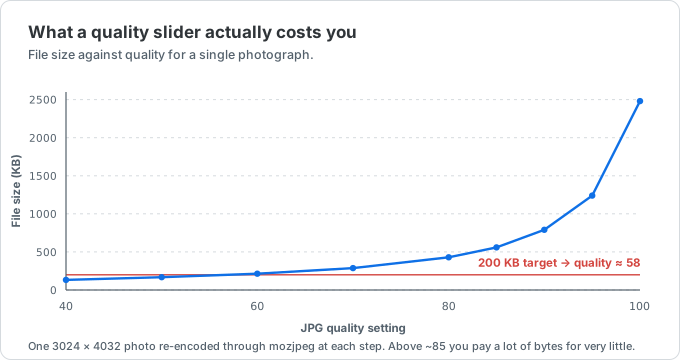
Most compression tools open with a slider and leave the decision to you, which means guessing: quality 90 costs several times the bytes of quality 65 for a difference you cannot see, and quality 40 saves little beyond 65 while starting to smear detail. PixSip uses one conservative default and gives every result a 1:1 comparison before download.
Because everything runs locally, you can shrink a PNG for the web, cut a phone photo down for email, or prepare a batch for a CMS without ever sending a file to a server.
Compress JPG, PNG, and WebP without losing visible quality
JPG and HEIC photos are re-encoded with MozJPEG at one consistent quality. The result view reports exact bytes and lets you inspect faces, text and fine detail at full resolution before saving.
PNG is where a lossless-only optimiser runs out of road: a 24-bit photo saved as PNG barely shrinks, because there is no redundancy left to squeeze. So photo PNGs are re-encoded to a colour palette first and then optimised losslessly with OxiPNG — on our 1024x695 reference photo that is 691 KB down to 252 KB, where a lossless pass only reached 536 KB. Screenshots, logos and line art already fit a palette, so they pay nothing for it, and the High quality preset keeps PNG bit-exact when you need the original pixels. Animated PNGs (APNG) keep their animation, and WebP goes through libwebp instead of the browser's built-in encoder.
The encoders — MozJPEG, libwebp, OxiPNG, libavif and libjxl — are the same open-source WebAssembly codec families used by Google's Squoosh. We aren't affiliated with Google or the Squoosh project; we use the same open-source technology and add the parts a batch workflow needs: multiple files at once, several output formats side by side, a ZIP download, and HEIC input — which Squoosh cannot decode in Chrome, Firefox or Edge.
Compare PixSip with Squoosh for batch workSee exactly what changed before you download
A byte count can't tell you whether a photo still looks right. Every compressed file gets a Compare view: drag the divider to wipe between the original and the result, and switch to 1:1 to inspect fine detail at full resolution, where compression artifacts actually show up.
If a result still looks too heavy, turn on conversion and compare a WebP or JPG alternative. Each selected format gets its own byte count, so you can judge the trade-off instead of guessing at settings.
100% browser-side — your images never leave your device
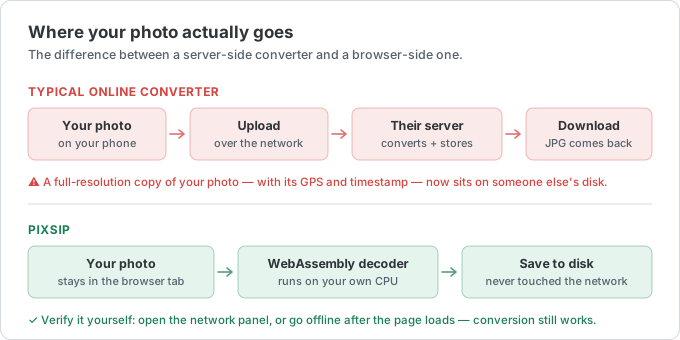
Many online compressors upload your photo to a server. PixSip's image pipeline runs on your own machine with WebAssembly, so the image bytes are not sent to PixSip. After the compressor reports its local codecs are ready, the prepared formats continue working offline.
That makes it safe for ID scans, medical images, contracts, and anything else you'd rather not hand to a third party.
Batch compress and download as a ZIP
Add up to 20 images at once on the Free plan, up to 5 MB each, with no daily image quota. Every file is processed independently, and you can download them one by one or grab the whole batch as a single ZIP.
No signup, no email, no watermark, and no per-file cost.
Every number on this page has a source
The 691 KB reference photo and the 46 dB PSNR figure come from documented measurements. The method and per-image results are published in the open.
Keep working with common formats and size limits
Each page opens the matching output format or exact size target.